
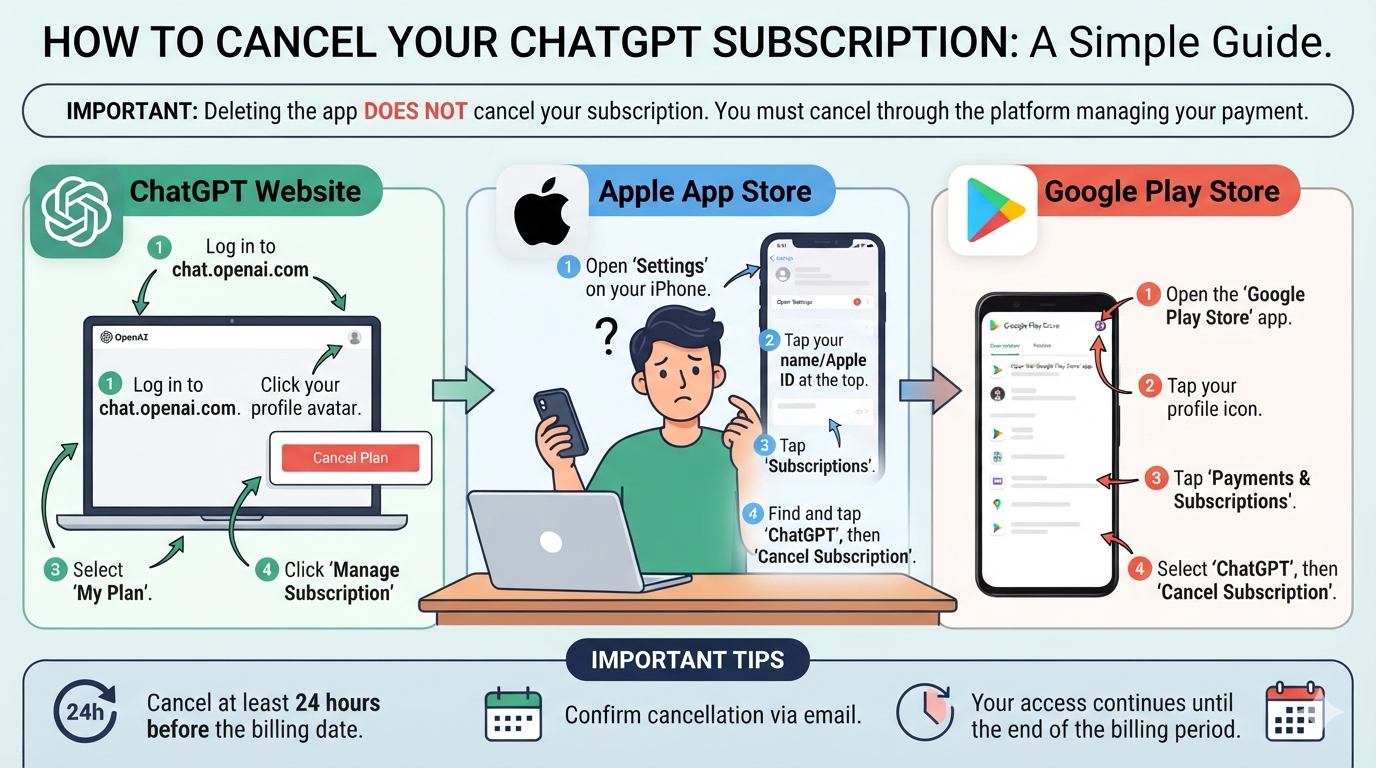
Knowing how to cancel ChatGPT subscription can save you from unwanted renewal charges. The process is simple when you use the correct platform. Your cancellation method depends on where you purchased your plan. You may have subscribed through ChatGPT, Apple, or Google Play. Each platform has its own cancellation settings. Many users make the mistake of deleting the app instead. However, removing the app does not stop subscription billing. You must cancel the subscription through the platform that manages your payment. OpenAI also recommends canceling at least 24 hours before your next billing date. This guide explains every important step in simple language. You will also learn about refunds, billing dates, account deletion, and common problems. The goal is to help you cancel confidently without missing an important step.
What Does Canceling a ChatGPT Subscription Mean?
When you cancel ChatGPT subscription, you are stopping future automatic renewals. This does not normally remove your ChatGPT account. It also does not automatically refund a previous payment. After cancellation, paid features generally remain available until the end of your current billing period. This gives you time to continue using features you already paid for. Your exact experience can depend on your payment platform and applicable rules. Before canceling, check your next billing date. It is also useful to check which account and platform are connected to your subscription. If you purchased through Apple or Google, their subscription systems manage the payment. If you purchased directly through ChatGPT, you manage billing inside ChatGPT settings. Understanding this difference makes cancellation much easier. It can also prevent duplicate subscriptions and unexpected charges.
How to Cancel ChatGPT Subscription on the Web
If you subscribed directly through the ChatGPT website, the cancellation process is straightforward. First, sign in to the ChatGPT account that has the paid subscription. Open your account menu and go to Settings. Then select Billing. Look for your current subscription and the cancellation option. Select Cancel under the available plan management options. Follow the instructions shown on screen to confirm your decision. Afterward, check your billing information to confirm that automatic renewal has been stopped. OpenAI currently advises users to cancel at least 24 hours before their next billing date. This helps reduce the chance of another renewal charge. Your paid access normally continues until your current billing period ends.
How to Cancel ChatGPT Subscription on iPhone
If you purchased your subscription through Apple’s App Store, you must manage it through Apple. The ChatGPT website cannot replace Apple’s subscription controls. On your iPhone or iPad, open the Settings app. Tap your name at the top of the screen. Next, select Subscriptions. Find and select ChatGPT from your active subscriptions. Then tap Cancel Subscription and confirm the cancellation. If you do not see the cancellation button, check the displayed expiration date. It may mean that the subscription has already been canceled. Remember that deleting the ChatGPT app does not cancel an Apple subscription. You must use your Apple subscription settings instead. OpenAI also states that deleting your ChatGPT account does not cancel an Apple-managed subscription.
How to Cancel ChatGPT Subscription on Android
Android users who purchased ChatGPT through Google Play need to cancel through Google Play. Start by opening the Google Play Store app. Make sure you are signed into the Google account used for the purchase. Open the subscriptions section and find ChatGPT. Select the ChatGPT subscription and choose Cancel subscription. Google Play may ask you to select a cancellation reason. Follow the remaining instructions until the cancellation is confirmed. You can also manage the subscription through the Google Play website. It is important to use the correct Google account. Some people have multiple Google accounts on one phone. Checking the wrong account can make your subscription appear missing. OpenAI confirms that uninstalling the ChatGPT Android app does not cancel your subscription.
How to Cancel ChatGPT Subscription Without Deleting Your Account
You do not need to delete your ChatGPT account just because you want to stop paying. Cancel ChatGPT subscription is usually enough when your goal is simply to stop future renewals. Your account can remain available for continued use. You can generally continue using the free version after your paid period ends. This option is useful if you want to keep your conversations and return later. Account deletion is a much bigger decision because it permanently removes your account. OpenAI says deleting an account cancels subscriptions billed directly by ChatGPT. However, Apple subscriptions require separate cancellation through Apple. Google Play subscriptions should also be checked before account deletion. Therefore, cancel the subscription first when your main goal is avoiding future charges.
Does Uninstalling ChatGPT Cancel the Subscription?
No, uninstalling the ChatGPT application does not cancel your subscription. This is one of the most common misunderstandings about app-based subscriptions. Removing an app only removes the application from your device. It does not change your payment agreement. If your subscription is managed through Apple, cancel it through Apple Subscriptions. If Google Play manages it, cancel it through Google Play. If you subscribed through the ChatGPT website, use the billing settings inside ChatGPT. This distinction is especially important if you rarely use the app. An unused subscription can continue renewing automatically. Before removing the application, check your subscription status. After cancellation, keep the confirmation or verify the next billing date. OpenAI specifically confirms that uninstalling ChatGPT does not stop subscription billing.
What Happens After You Cancel ChatGPT?
After you cancel ChatGPT subscription, your paid plan normally stays active until the current billing period ends. This means cancellation does not usually remove your paid benefits immediately. You can continue using eligible paid features during the remaining period. Once that period ends, your subscription will not renew. Your account itself can remain active. This is useful for people who want to stop spending money while keeping access to their account. You should still verify that the subscription shows an appropriate cancellation or expiration status. Check the billing platform that originally processed your payment. If you have subscriptions on multiple platforms, check each one separately. OpenAI notes that users can accidentally create duplicate subscriptions through different platforms. Therefore, reviewing your billing history can be a smart final step.
Can You Get a Refund After Canceling ChatGPT?
Canceling a subscription does not automatically create a refund. A cancellation mainly prevents future renewals. Refund eligibility depends on several factors, including the purchase method and your location. For web purchases, refund requests can be submitted through OpenAI Support while signed into the relevant account. Google Play purchases can also be handled through OpenAI Support. Apple App Store purchases require refund requests through Apple. Certain regional consumer rights may also apply. For example, OpenAI lists specific refund rights for residents of the European Union, United Kingdom, and Turkey. Because refund rules can change, check the current refund guidance before submitting a request. Do not assume that simply forgetting to cancel guarantees a refund. Cancellation and refund requests are separate processes.
What If You Cannot Find Your ChatGPT Subscription?
Sometimes users cannot find their subscription because they are checking the wrong account. This can happen when someone has multiple ChatGPT accounts. It can also happen when the purchase was made through Apple or Google. First, check the email account connected with your purchase. Then review your payment receipt to identify the billing platform. A website subscription will not appear inside Apple or Google subscriptions. Similarly, an Apple subscription needs to be managed through Apple’s system. If you use Google Play, check each Google account on your device. If you still cannot find the subscription, contact the appropriate support team. OpenAI recommends checking your original purchase receipt to identify where the subscription was purchased. This simple step can quickly solve many cancellation problems.
How to Avoid Duplicate ChatGPT Subscriptions
A second subscription can happen when users subscribe on different platforms. For example, someone may already have a ChatGPT subscription through Apple. They might later subscribe again through the ChatGPT website. This can result in multiple active subscriptions and separate charges. Before purchasing a new plan, check your existing subscriptions. Review ChatGPT billing, Apple subscriptions, and Google Play subscriptions. If you discover multiple subscriptions, decide which one you want to keep. Then cancel the subscription you no longer need through its original billing platform. Keep records of cancellation confirmations when possible. This habit can make future billing problems easier to resolve. OpenAI specifically warns that subscribing across multiple platforms can result in duplicate charges.
What If You Cannot Sign In to Your ChatGPT Account?
You can still seek help if you cannot access your account. If your subscription is billed directly by ChatGPT, OpenAI Support may help cancel it. You should provide enough information to help verify the subscription. OpenAI asks for the account email, the last four digits of the payment card, and the latest subscription payment date. Never provide your complete card number. If Apple manages the subscription, use the Apple account connected with the purchase. If Google Play manages it, use the Google account connected with the subscription. Account recovery may be necessary if you cannot access those store accounts. Taking this route is safer than opening another account and subscribing again. A new subscription can create more billing confusion.
ChatGPT Subscription Cancellation Checklist
Before you cancel ChatGPT subscription, use a simple checklist. First, identify where you purchased the plan. Check whether it was ChatGPT, Apple, or Google Play. Next, find your next billing date. Cancel at least 24 hours before that date when possible. After cancellation, confirm that automatic renewal has stopped. Keep your cancellation confirmation for your records. If you want a refund, remember that cancellation does not automatically provide one. Submit a separate refund request through the correct platform. Also check for duplicate subscriptions if you have used more than one device. Finally, decide whether you want to keep your ChatGPT account. You usually do not need to delete it simply to stop payments. These steps can help you avoid unnecessary charges and reduce billing confusion.
Detailed ChatGPT Cancellation Table
| Situation | Where to Cancel | Important Action |
|---|---|---|
| ChatGPT website subscription | ChatGPT Settings | Open Billing and cancel the plan |
| iPhone subscription | Apple Settings | Open Subscriptions and select ChatGPT |
| Android subscription | Google Play | Open Subscriptions and select ChatGPT |
| ChatGPT Business | Workspace settings | Open Billing and manage the plan |
| App was deleted | Original billing platform | Deleting the app does not cancel billing |
| Want a refund | Appropriate support platform | Cancellation does not automatically refund |
| Cannot access account | OpenAI, Apple, or Google support | Use the platform that manages billing |
| Multiple subscriptions | Each billing platform | Find and cancel unwanted duplicate plans |
Common Mistakes When Canceling ChatGPT
Many cancellation problems come from simple mistakes. The biggest mistake is assuming that deleting the application stops billing. Another mistake is checking the wrong Apple, Google, or ChatGPT account. Some users also wait until the exact billing date to cancel. OpenAI recommends canceling at least 24 hours before the next billing date. Another common mistake is expecting an automatic refund after cancellation. A refund request is separate from subscription cancellation. Users should also avoid sharing sensitive payment information with unknown people. If support requests payment verification, provide only the information officially required. Finally, do not create a new subscription simply because the old one is difficult to find. First identify where the original purchase was made. These simple precautions can prevent many unnecessary billing problems.
Frequently Asked Questions
1. How do I cancel ChatGPT subscription quickly?
The quickest method depends on where you purchased it. Website purchases can be canceled through ChatGPT Billing settings. Apple purchases use Apple Subscriptions. Google Play purchases use Google Play subscriptions. Always confirm the cancellation afterward.
2. Does canceling ChatGPT delete my account?
No, cancellation and account deletion are different actions. You can stop your paid subscription while keeping your ChatGPT account. Account deletion is only necessary if you want to permanently remove the account.
3. Does deleting the ChatGPT app stop billing?
No. Uninstalling the application does not cancel a subscription. You must cancel through the platform that manages your payment. This may be ChatGPT, Apple, or Google Play.
4. Can I get a refund after canceling?
Cancellation does not automatically provide a refund. Refund eligibility depends on your purchase, location, and applicable refund rules. Web and Google Play users can contact OpenAI Support. Apple purchases require contacting Apple.
5. When should I cancel before my billing date?
OpenAI recommends canceling at least 24 hours before your next billing date. This gives enough time for the cancellation to process before another renewal.
6. Why cannot I see my ChatGPT subscription?
You may be signed into the wrong account or checking the wrong platform. Review your original payment receipt first. Then check ChatGPT, Apple, or Google Play based on where you purchased the subscription.
Conclusion
Learning how to cancel ChatGPT subscription is simple once you identify the correct billing platform. Website subscribers should use ChatGPT’s billing settings. iPhone users should manage their plan through Apple Subscriptions. Android users should use Google Play. Remember that uninstalling the app does not stop billing. Also remember that cancellation does not automatically create a refund. Check your billing date and cancel early whenever possible. If you have multiple subscriptions, review every platform before making another purchase. Keeping your account does not require keeping a paid plan. A careful cancellation process can help you avoid unnecessary charges. If you are unsure about your billing status, checking your original payment receipt is a good first step. With these steps, you can manage your ChatGPT subscription with confidence and avoid common billing mistakes.
About the Author